
FEATURES
All the tools you need to run your business in a single application.
Overview
Easify software includes lots of features that help you run your business - including Stock Control, Invoicing, Quoting, Purchasing, EPOS Point of Sale, Cashbook, Reporting and more...
Easify runs on PCs and laptops running Microsoft Windows™ so you won't need expensive hardware to run it on.

Features
Whatever the type and size of your business from SMEs to multi-department companies, Easify gives you the software tools you need to run your business - all in a single easy to use application.
From first contact with a prospective customer, to quoting them for a job, to tracking the progress of their order, to billing and recording cash flow. Easify helps to automate every stage freeing you to spend more time doing business.
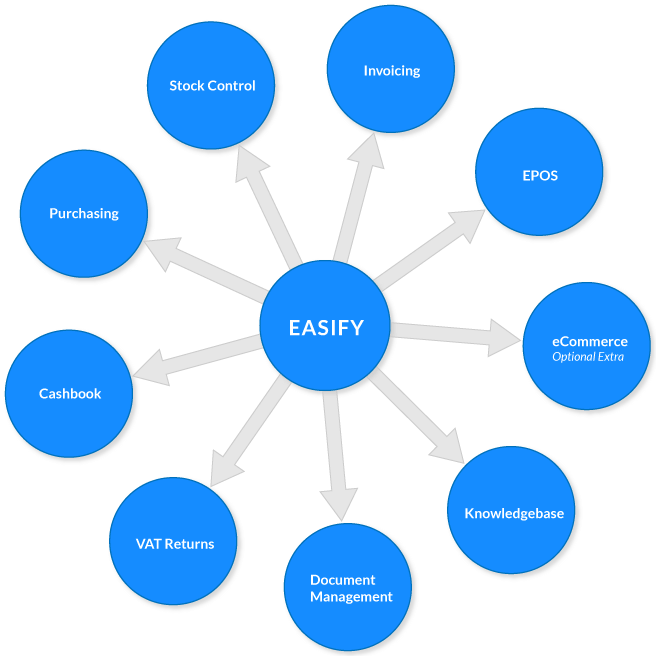
All of the above features are built into Easify as standard, with the exception of eCommerce which you can choose to purchase separately if you need it.
If you don't need all of these features? No problem, you can just use the features that you want.
Below is a full list of all the features of Easify:

Bookkeeping
Easify helps to automate your bookkeeping allowing you to spend more time running your business...
- Automatically generates your books as you trade
- Reduces the time required by bookkeepers
- Sales via EPOS tills automatically recorded in your accounts
- Sales and purchases raised in back office automatically recorded in your accounts
- Real-time Cashbook - always up to date
- Fully compatible with HMRC Making Tax Digital for VAT
- Ideal for UK VAT registered Ltd companies.
- Full support for non VAT registered companies.
- Keep track of your customer credit limits
- Built in reconciliation system helps with error checking
- Comprehensive reporting, sales reports, who owes you money, profit & loss etc...
- Export bookkeeping data to CSV for external analysis
- Spend more time running your business and less time managing paperwork
- Remote access features allow bookkeepers and accountants to login remotely
- Learn more about Bookkeeping with Easify

Stock Control Software
Manage your products & services with Easify Stock Control Software and instantly know how much you have in stock.
- Record detailed information about your stock, products or services
- Add multiple pictures to your product information, ideal for eCommerce
- Set prices using margin, markup or inc. VAT prices
- Record stock levels which are automatically depleted as you sell
- Colour-coded stock list tells you when stock levels are low
- Create and customise your own stock categories
- Create quotes and orders by simply dragging and dropping a product onto an order
- Set re-order levels for stock items
- Display of when an item was last price checked
- Display of when an item was last stock checked
- Record EAN codes for stock items
- Print price / barcode labels for stock items
- Set tax rates for individual stock items
- Record a variety of stock details - supplier SKU, manufacturer SKU, your SKU etc...
- Full stock allocation system, allocate products and never oversell your stock
- Publish your products to pricelists, and easily print pricelists for retail or trade
- Set product default margins by product category and subcategory
- Automatically update stock levels when purchases are checked into Easify
- Automatically change prices if they are updated during a purchase
- Record product condition and notes, ideal for second hand products
- Assign loyalty points to products to reward loyal customers
- Synchronise your stock levels with your eCommerce website
- Import products from a 3rd party CSV file or price list
- Learn more about Easify Stock Control Software

EPOS
Easify features a full EPOS system as standard. Simply plug in a till, barcode scanner & receipt printer and Easify your shop front.
- Powerful EPOS software included as standard
- Compatible with most standard EPOS hardware i.e. Till drawers, barcode scanners, receipt printers.
- Add items to sales via barcode scanner or manual entry
- View live stock levels and allocations in the POS
- Add items to sales via text search directly from POS
- Edit line item comments from POS system
- Add new customer records directly into POS system
- Modify sale item prices
- Save and recall sales at the click of a button
- Can be driven by keyboard or mouse input
- Take payments via Cash, Card, Cheque or other means
- Take part payments and deposits
- Apply discounts to sales either fixed amount or percentage
- Add as many tills as you like
- Stock levels depleted automatically as items are sold
- Can synchronise stock levels between till and eCommerce website
- One click returns / refunds
- Customise the EPOS display with your own logo
- Process orders on account via POS
- Automatically uses trade pricing for your trade customers
- Warns operator if customer exceeds their credit limit
- Notifies you if you are overselling allocated stock items
- Full support for PaymentSense integrated contactless / Chip & PIN card payments
- EPOS transactions automatically posted to your accounts in Easify
- Full featured cashing up system helps track down till discrepancies
- Loyalty points system allows loyal customers to earn discounts

Cloud Access
Easify at home, in the office, site visits, on the road, trade shows... anywhere you have an internet connection!
- Securely login to Easify from anywhere, at home, on the road, at a trade show etc...
- We host your Easify on our ultra fast and reliable Microsoft Azure Cloud servers
- Uses the familiar and responsive Easify Pro Windows desktop app - not browser based
- Never worry about security, backups or data loss again - let us manage it for you
- Your Easify Data backed up by us every day to 3 separate secure Microsoft Azure data centres
- Rock solid for ECommerce and connecting to an online shop
- Fully PCI-DSS compliant - you don't need any open ports on your firewall
- Easify Cloud Server subscribers receive priority support
- No more worrying about your PC failing, get back in business in minutes
- No more worries about upgrading your PC or Laptop. Just buy a new PC and install the Easify Pro client in a matter of minutes
- Supports connection of Microsoft Excel to Easify for custom reporting and analysis
- The easy way for your accountant or bookkeeper to remote into your accounting records
- Ideal for remote workers and field sales
- Cloud subscribers receive priority support from Easify
- We do any updates for you, never worry about an update causing problems
- Only a 30 day minimum contract. Ideal if you need Easify for a short period of time, or need extra seasonal staff access
- Free updates for life, with your Easify Cloud Server you always qualify for the latest version of Easify
- Spread your costs, spread your operating costs over time with known subscription fees
- Pre-pay for 12 or 24 months and save up to 50%
- Lower total cost of ownership, we provide the server hardware, we manage the IT for it, we tend to your data backups
- No need to purchase and maintain expensive in-premises servers, we do that for you
- Optimised for low bandwidth, works fine over a 3G connection e.g. using your smartphone as a mobile hotspot or tether
- View real-time reports on your smartphone or tablet with Easify Web
- Learn more about Cloud Access

Orders
Easify helps you track your orders and makes sure they are completed and paid for on time.
- Easily create quotes and orders by adding products to an order
- Convert quotes into orders at the click of a button
- Powerful workflow features help you track and manage your jobs
- Comprehensive order management screen displays everything you need to know
- View all active orders
- Modify order status as jobs progress to instantly know the status of an order
- Record the source of an order i.e. internet, shop sale, business sale, etc...
- Track and view individual status of line items within an order
- Colour-coded order management screen shows you late payers and job schedule status
- Easily search for orders by order number, company or customer name
- Keep detailed internal notes for each order and be notified by email when they are updated
- Assign orders to users
- Schedule jobs
- Easily view your jobs using the Easify Active Jobs List
- Filter the order management screen to show whether orders have been invoiced and paid
- Record hours spent per user on each order for easy time billing
- Add detailed comments to each line item in an order
- Print fully customisable invoices and record when they are sent
- Print job cards for orders including items required and internal notes
- View the gross profit for an order discreetly at the click of a button
- View and set status of each line item i.e. In Stock/Out of Stock/On Order etc...
- Set tax rates by individual line item
- Assign trade prices to entire orders
- Record payments made for each order including deposits
- Create payment plans for orders, your customers pay in instalments
- Instantly access orders taken via EPOS system
- Print invoices to PDF for ease of emailing to clients
- Document Management System (DMS) - store files and paperwork with your jobs
- Record product serial numbers on orders
- Easily see the status of your jobs at a glance
- Staff can communicate job status and progress updates via email from Easify as they work
- Fully integrated with Easify accounting features
- Support for EU VAT and reverse charge VAT schemes on orders
- Orders automatically record VAT ready to send to HMRC using Making Tax Digital for VAT

Paperwork Designer
Customise your public facing paperwork to look just how you want it.
- Built in paperwork designer
- Fully customise your public facing paperwork such as Estimates, Quotes, Invoices, Purchase Orders etc...
- Create customised barcode price labels, price tickets and shelf edge labels at any size
- Drag and drop the data you want on your paperwork from a pre-defined list
- Customisable print menus allow you to print what you want and where you want
- Modify existing paperwork to display alternative data
- Powerful formula editor allows you to precisely format what appears on your paperwork
- Add graphics such as company logos to your paperwork with a few clicks
- Paperwork designs are stored in the database for instant deployment to all your Easify users
- Easy to use WYSIWYG (What You See Is What You Get) user interface
- Create custom paperwork for products, customers, orders and purchases
- Paperwork can be printed to paper, or to PDF for emailing to clients / suppliers etc...
- Use in conjunction with the built in Document Management System, easily save invoices / quotes etc... for future reference

Purchases
With a built in and powerful purchasing system, you can easily record and manage your purchases.
- Record your purchases in Easify
- Create purchase orders for your suppliers
- Automatically back-flush changed prices from purchases into your Easify product inventory
- Set purchase types based on HMRC codes and create custom purchase types
- Check in items as they arrive and automatically update your stock levels
- Raise purchases for non-stock items such as petty cash purchases, fuel, expenses etc...
- Record internal notes on each purchase, and optionally auto-email them to colleagues
- Enter schedule information such as date required, date ordered, date expected etc...
- Record serial numbers of items when they arrive
- Search for purchases containing a serial number, ideal for warranty processing
- Track the status of your purchases from creation to receipt
- Record payment details for purchases
- Print purchase orders to PDF or paper
- Search purchase history by supplier, invoice number or item serial number
- Assign purchases to your Easify users
- Purchase orders automatically record VAT data for submission to HMRC via Making Tax Digital for VAT
- Support for EU VAT on purchases as well as reverse charge VAT schemes for overseas purchases

MTD VAT Returns
Generate VAT Returns based on your sales and purchases, and digitally submit them to HMRC using making Tax Digital for VAT
- Fully HMRC MTD compatible VAT Returns
- Easify automatically generates your VAT return, you just record sales and purchases as you go
- A single click automatically fills out all of your VAT Return fields based on your Easify data
- Generate VAT Returns for manual processing or submit your VAT Return to HMRC digitally
- Generate a VAT return for any period (even 1 day) to assist with training or testing
- Reconciliation feature allows you to reconcile your accounts prior to generating a VAT Return
- Supports EU VAT & Reverse Charge VAT Schemes.
- A complete future proofed MTD ready system, no need for 3rd party accounting tools or plugins
- Export complete VAT return breakdown to CSV file for review by your accountant
- Supports Standard VAT Scheme and Cash VAT scheme

Invoicing
Hassle-free invoicing system for your business and customers.
- Generate an invoice for a customer with a couple of clicks
- Invoices can be printed to paper or saved to PDF and emailed to your customers
- Put your company logo on invoices using the Easify Paperwork Designer
- Invoice layout can be fully customised exactly how you want it
- Split payments on an order and invoice separately for each instalment
- Invoice multiple customers in one go (bulk invoicing)
- See at a glance which orders have been invoiced for and which haven't
- Seamlessly integrates with the Easify VAT system, invoices automatically appear on your VAT return
- Invoices can be saved to the Easify Document Management System as a PDF
- Auto-print invoices from the Point of Sale or Trade Counter to multiple printers

Reports
Detailed reports tell you the status of your business whenever you need it.
- View real-time reports on your smartphone or tablet with Easify Web
- Instantly view list of items required to fulfil orders
- Create report of all active jobs and orders
- Full reporting of sales for selectable date range
- Print stock take sheets to assist with stock taking
- View payments received for date range including payment type
- View product sales for period by product category
- View product sales for period by supplier
- Who owes you money (aged debtors)
- Print customer statements to PDF or paper
- Who you owe money (aged creditors)
- Items needed to re-order
- Detailed audit history, see what your Easify users have been doing
- Purchase reports tell you what you have spent for a given period
- Export Sales and Purchases to CSV to send to your accountant
- Auto-generate VAT returns and export the data to CSV for external checking / analysis
- Easify Cloud Subscribers can connect Microsoft Excel to Easify for custom reporting
- Optional Easify API Subscription allows you to create any report in your chosen programming language

Quotes
Create professional looking quotations for your products and services, print them or send them to your clients as PDFs.
- Create quotes by dragging and dropping your stock items and customers
- Print professional looking quotes for your customers
- Create 'sanitised' quotes that hide line item cost showing only total price
- Give your clients quote numbers so that you can easily retrieve their information
- Make copies of quotes as a basis for new quotes
- Print quotes to PDF for ease of emailing to clients
- Add printable comments to each item on your quotes
- Track which quotes are in progress and which quotes are complete
- Print estimates when you are not working to a fixed price
- Turn a quote or estimate into an order at the click of a button
- Add private (internal) notes to a quote to record conversations or customer requirements
- Optionally email internal notes to your team members to help communicate work instructions
- Save related files (images, documents, emails) to the Document Management System for easy future retrieval
- See your in-progress and completed quotes at a glance
- Quotations and estimates do not show in reports or in VAT returns

Messaging
Instantly receive email updates whenever the status of an order or purchase is updated.
- Add internal notes and comments to your orders and purchases
- Receive email notification the instant an internal note is updated
- Managers can choose to receive email notification of all internal notes
- Review previous internal notes to help resolve customer disputes
- A great way to communicate job progress with your team
- Let your team know by email when a part has come into stock
- Automatically monitor the progress of a job via email as people update the internal notes

ECommerce
Connect your online business to Easify software and auto-synchronise stock levels beteen the two.
- Upload product details and product images from Easify to your website
- Synchronise stock levels between online and physical shops
- Supports the WooCommerce / WordPress shopping cart system
- Online orders are automatically sent to Easify for processing
- Greatly reduces the need to manually copy web orders to your accounting system
- Orders placed via your website automatically appear in your accounts and in your VAT return
- When a product is sold via a shop till, the stock level is instantly reduced on your website
- When a customer buys a product from your website, the stock level in-premises is automatically reduced
- Easily make changes to your product listings in Easify without having to login to your website
- Use the Easify API to write your own custom plugins - connect Easify to any eCommerce platform
- Learn more about eCommerce

Users
Give your users access to only the areas they need to do their jobs.
- Built in security system - only authorised users can login to Easify
- Set permissions by user - you decide which features of Easify a user can access
- Users can change their own passwords
- Unlimited number of users depending on licenses
- View history of user actions e.g. edit product, login etc...
- Administrators have full control over all users
- Easify passwords encrypted for maximum security
- Disable or enable user accounts
- Assign users to orders and purchases, lets them see what's in their active jobs list
- Users can email each other from within Easify (internal notes) to communicate job progress
- Easify Subscription Users can access Easify remotely - from home or on the road etc...

Customers
Store details of your customers with Easify's CRM features and view their order history.
- Store 1000's of customer records
- Record customer delivery details
- Append notes to customer records
- View complete order history for customers
- Search for customers by name, address or even phone number
- With the optional Postcode Lookup facility you can easily search on a customers address by postcode to reduce problems caused by incorrectly entered addresses Click here for more information...
- Set payment terms for each customer
- Set an automatically applied percentage discount for each customer
- Export Easify customers to file for easy import into Excel
- Import customers from CSV file into Easify
- Set credit limits for your customers
- Setup trade customers and automatically use trade pricing for them
- Instantly see which customers owe you money and how long they have owed it for
- Print financial statements for customers and print to PDF or paper
- Reward customers with loyalty points for their purchases
- Orders raised for your customers are automatically recorded in your VAT return

Suppliers
Raise and issue purchase orders for your suppliers.
- Enter details for all your suppliers
- Store supplier address and contact details
- With the optional Postcode Lookup facility you can easily search on a suppliers address by postcode to reduce problems caused by incorrectly entered addresses Click here for more information...
- Assign suppliers to your stock items
- Keep notes for each supplier
- Easily raise purchase orders for your suppliers
- Record credit limits and payment terms for suppliers
- Purchase orders raised for your suppliers are automatically recorded in your VAT return
General Features
- Simplifies management of your business workflow
- All in one solution for HMRC Making Tax Digital for VAT
- Makes it easy to keep track of your ongoing jobs and always know their state
- Runs on any PC running Microsoft Windows 7 or later
- Native Windows Desktop application is fast, powerful and intuitive
- Fully integrated - everything you need in a single package
- Easy to use by you and your staff - a minimum of training required
- Works brilliantly on a single PC, over a network or remotely over the internet
- Stay connected with your business workflow via email notifications of order updates
- Free support via email and forums
- Extensible - add on any functionality you require with the Easify API
