
Easify News - 24th October 2009
After several months of development, Easify Feature Pack 2 is almost out of beta...
As always, Easify feature packs are free upgrades that give you great new features as well as critical updates and bug fixes. Read on for the full list of new features that Feature Pack 2 will provide...
Easify Feature Pack 2 includes several enhancements for existing areas of Easify, as well as some brand new features that will allow you to Easify even more of your business.
What's new in Easify Feature Pack 2?
Easify with Feature Pack 2 will now deal with more of your accounts receivable tasks with the addition of the facility to print aged debtors reports and customer statements.
And we're making in-roads into accounts payable with the inclusion of a powerful yet (as always) easy to use purchasing system.
Returns handling has been greatly enhanced and simplified, and handling of trade accounts via the POS has been overhauled too.
30 Day Trial Period Reset for FP2
For Easify Feature Pack 2 we are resetting the trial period back to 30 days, so if you have previously tried Easify but your trial period has expired, you will be able to download Easify 2009 with Feature Pack 2 on the 6th November 2009, and receive another 30 days in which to evaluate Easify complete with its new features.
Improved Returns / Refunds Handling
By popular demand we have improved the handling of returns and refunds in Easify, both in the POS, and in the back end.
Processing a return via the POS is now as simple as adding the product to be returned and pressing the F7 button. In the back end simply add the returned product to an order and set its status to 'Returned'.
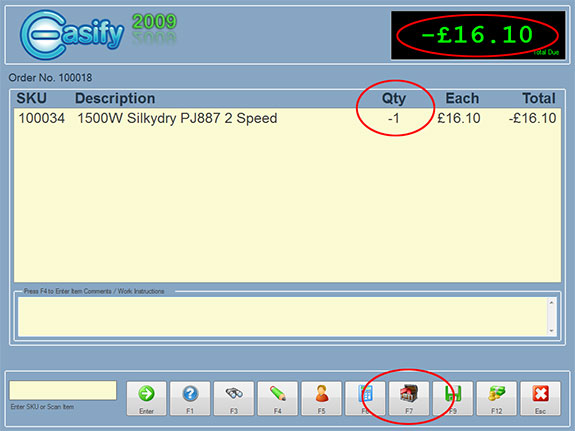
Easify 2009 with Feature Pack 2 also handles exchanges and returns all within the same sale. If your customer wishes to return an item and receive exchange items with cash adjustment, simply add the returned item(s) to the sale, then add the exchange item(s) to the sale and easify will total it all up and allow you to make the correct cash adjustment quickly and easily.
Purchasing and Purchase Ordering System
The biggest change for Easify 2009 feature Pack 2 is the inclusion of a powerful yet easy to use purchasing and purchase ordering system.
This powerful purchasing facility allows you (or your staff) to raise purchases for stock, or any other purchasable item for that matter, and to track the progress of the purchase from ordering to receipt of order.
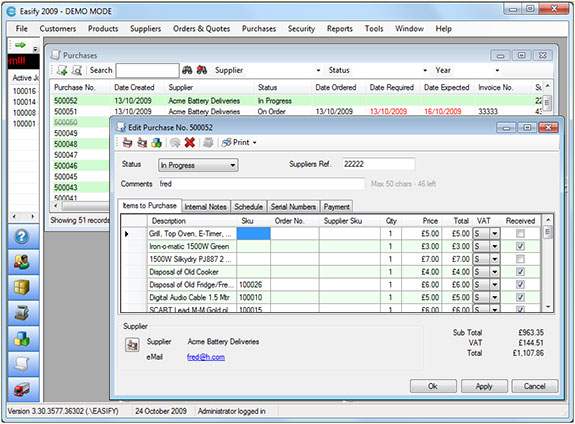
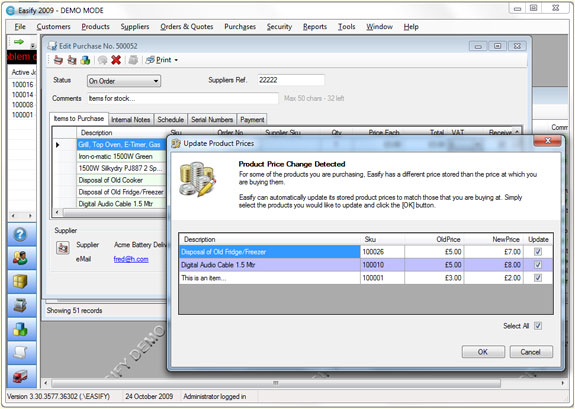
When you place an order with a supplier, Easify will detect any stock items in the order that have changed in price and will give you the opportunity to update their prices accordingly.
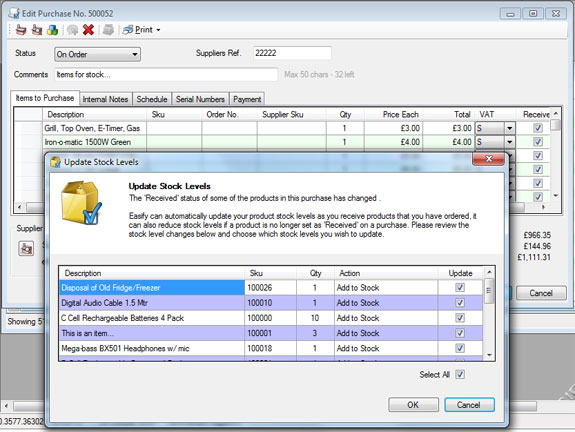
When you receive the ordered items from your supplier, simply open the purchase in Easify and tick off each received item. Easify will then allow you to automatically update your stock levels to reflect the items received into stock.
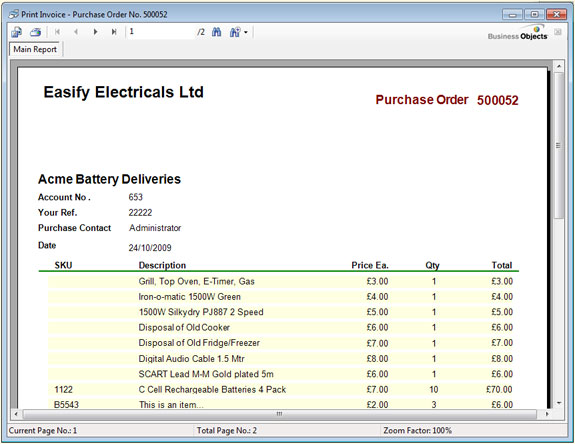
And no purchasing system would be complete without the ability to print purchase orders.
Simply open a purchase, select Print > Purchase Order and Easify will produce a purchase order that you can either print and post, print to FAX or save as PDF and email to your supplier.
Improved Support for Trade Accounts
Trade accounts are now even better supported in Easify 2009.
With Feature Pack 2 you can now flag customers as trade customers, set them a credit limit and also set their default payment terms.
When you select a trade customer for a sale via the POS or back end, the sale will automatically be made at your trade prices.
The POS also now allows you to process sales on customers accounts.
Accounts Receivable Enhancements
Now that Easify supports customisable payment terms for customers and credit limits, we have included the facility to print aged debtors reports so that you can easily see who owes you money, and how long they have owed it for.
In addition to that, you can now print customer statements that can be printed to paper or saved as PDF.
Payment terms are fully customisable allowing you to create and modify as many payment terms as you need. Payments terms can be set to as many days as you wish.
Customer Data Import
Easify 2009 FP2 will include an import facility that will allow you to import your customer list into Easify.
Simply export your customers from your old database to a CSV file, and import them into Easify with a couple of clicks.