
Easify News - 16th March 2010
We are pleased to announce that Easify Feature Pack 3 is nearing completion...
Easify Feature Pack 3 includes several enhancements for existing areas of Easify, as well as some brand new features that will allow you to Easify even more of your business.
As always, Easify feature packs are free upgrades that give you great new features as well as critical updates and bug fixes. Read on for the full list of new features that Feature Pack 3 will provide...
Easify Feature Pack 3 Feature List
An all new product import software facility will allow you to import products from CSV or TAB delimited files directly into Easify. The ideal way to automate your price checking!
Easify Feature Pack 3 now enables you to customise Order Types. Rather than using built in order types you will be able to tailor these to exactly suit the needs of your business.
Edit and review payment history directly within an order itself. As of Easify Feature Pack 3 you will be able to review and edit payment history for an order directly within the order.
Export sales data and purchase data. We have included the facility for you to export sales data and purchasing data to CSV files.
Support for setting default margins on product categories. Now when you add a new product to Easify, it can obtain its default margin from the category it is created in. So no more having to remember which product category carries which margin.
30 Day Trial Period Reset
For Easify Feature Pack 3 we are resetting the trial period back to 30 days, so if you have previously tried Easify but your trial period has expired, you will be able to download Easify 2009 with Feature Pack 3 on the 29th March 2010, and receive another 30 days in which to evaluate Easify complete with its new features.
Product Import Software
You have spoken and we have listened... Many of you have requested that we add a product import facility to Easify so we have done just that.
Easify Feature Pack 3 will feature a powerful product import facility that will allow you to import products from CSV or TAB delimited files.
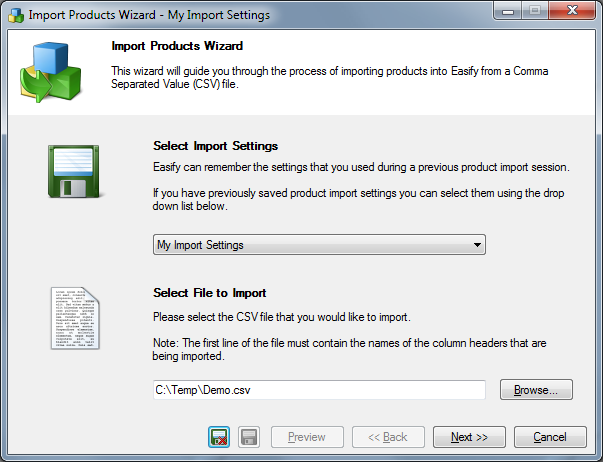
For repetitive import tasks such as routine price checking you can save the settings and mappings for your product import so you only ever have to enter them once.
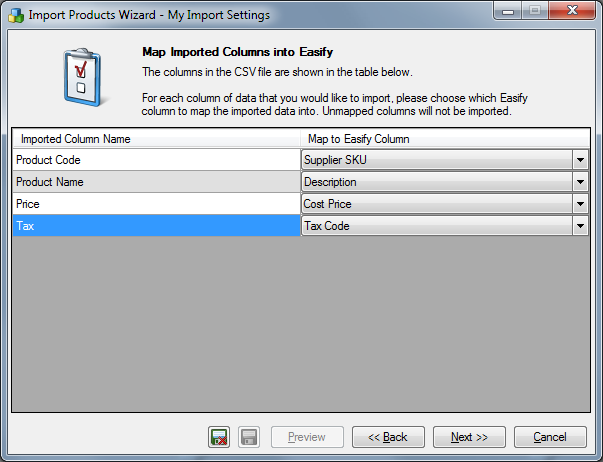
Easily and quickly map imported columns into Easify.
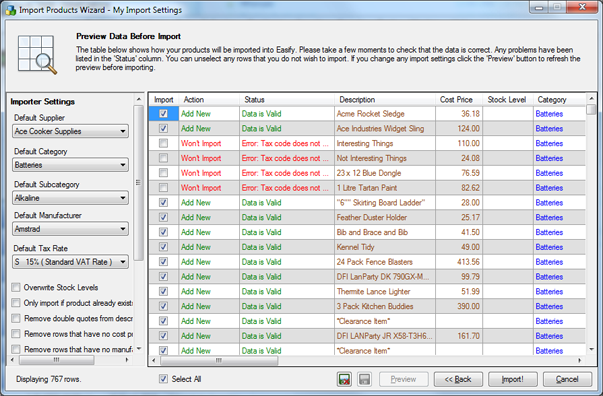
Preview your imported data and easily deal with any issues using Easify's detailed error reporting and colour coded import preview.
For some business software packages, product import software is an add on that you have to purchase. With Easify product import software now comes as standard.
Review and Edit Payment History
Now you can easily review and edit payment history directly within your orders.
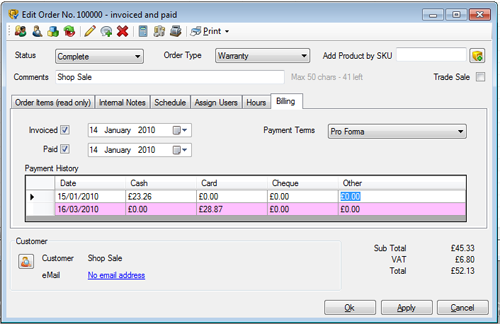
Great when you need to review payment history for an order, or when you simply need to correct an error with user data entry.
Export Sales and Purchasing Data
Export your sales and purchasing data to CSV.
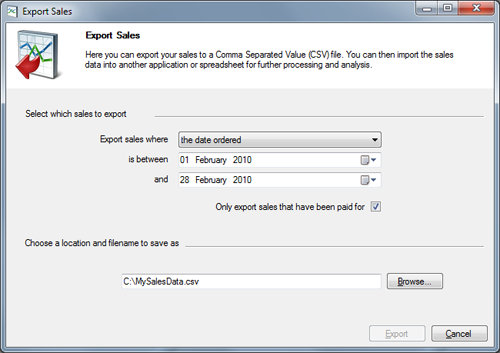
Also new for Feature Pack 3 is the facility to export sales and purchasing data to CSV. Ideal for when you want to export your data for further manipulation in Excel, or simply want to get a copy of your year end accounts to your accountant.
Default Margins for Product Categories
If you have ever added a new product in Easify and instantly forgotten which margin you normally use for it, then this new feature is for you.
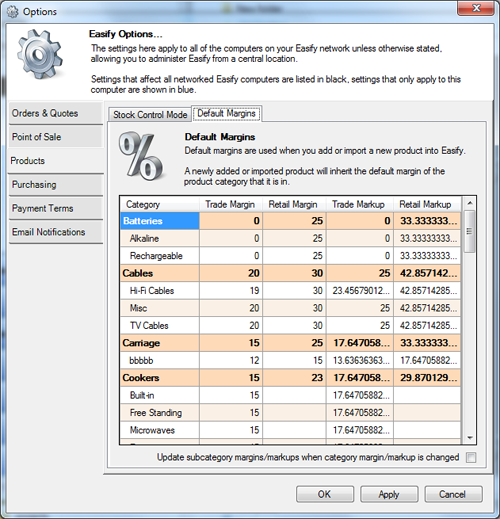
The ability to set default product margins (or markups) in Easify 2009 feature Pack 3 means that you never have to remember a product margin ever again.
Now when you add a product to Easify, it will automatically adopt the margin of the product category that you create it in. Naturally you are still free to change the margin of a product to whatever you like, but this new feature will definitely be a time saver and indeed a money saver.
Customise Your Order Types
In Easify Feature Pack 3 you now have full control over which Order Types are supported in Easify.
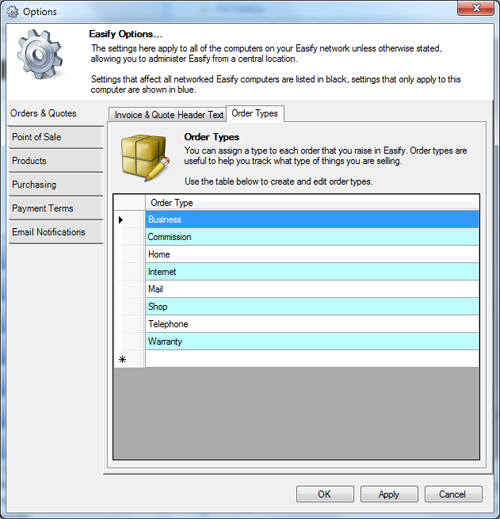
Create your own list of the types of order that you deal with such as 'Mail Order', 'Bespoke Software', 'Shed Sales', 'Consultations' etc... and you can then set your orders to the types you have created.
Then when you run your sales reports, Easify will tell you how much of each type of order you have sold for a given period. A brilliantly easy way of keeping track of where your sales revenue is coming from!
Customise Your Order Types
If you want to open your till without using a key, simply press Ctrl+O and the till will open automatically.
You can choose who you allow to have the permission to open the till, and we've programmed the facility for supervisors with the relevant permission to be able to authorise a till open for a non authorised user.
We have also locked down the use of the F6 Discount button in the POS Software so that only authorised users are allowed to give discounts via the POS.
Drag and Drop Product Category Changes
Let's say you have imported 500 products into your Easify stock control software, and you need to organise them into suitable product categories...
Now you can simply select one or more products in the main products window and drag and drop them into the subcategory of your choice.
What's more you can now drag and drop multiple products to quotes orders and purchases if you want to.
Easify Now Supports Product Deletion
Typically in Easify to remove unwanted products from your stock inventory you would discontinue them. In feature pack 3 we have included the facility to completely delete unused products.
As long as a product hasn't been used on a quotation or order, you can select it and click the delete button in the main products window.
Improved Support for Trade Sales
For Feature Pack 3 we have made trade sales easier to manage by moving trade sales out of the order types list and into its own checkbox on a quote or order.
This means you can now have trade sales with distinct order types such as telephone trade sale, internet trade sale etc...
Improved Sales Reporting
For sales reports we have changed the report so that it reports by the date that the order was sold (Date Ordered) rather than the date that the order was raised (Date Raised). This provides more accurate sales reporting for users that process sales orders and may have quotations sitting on the system for considerable time before converting the quote to an order.